
Clearly Local × Lenovo — AI Accelerated Image Production for Global Product Launches
Key Highlights
AI image generation accelerates ideation and base image creation, but professional post-production is essential to achieve enterprise-grade quality and brand consistency.
A structured hybrid workflow—combining AI-assisted concept generation, iterative prompt refinement, and manual retouching—enables faster iteration and greater creative flexibility for global product launches.
The greatest value of AI in enterprise visual production is not replacing human designers but amplifying their efficiency and scalability, allowing more ideas to be explored quickly while maintaining precision and brand fidelity.
Client Background
When Lenovo’s Commercial Notebook business unit needed a new way to produce product visuals, the challenge was not simply creative. It was operational.
The team needed a steady flow of high-quality images for two related projects: visuals for Lenovo Commercial Vantage, a PC management software product, and a new topic for the Notebook business line. The deliverables were not limited to one format or one style. They included detailed functional illustrations, scene-based visuals, and website-ready cover images. Each image had to serve a different purpose, but all of them had to feel consistent with Lenovo’s brand and product story.
The project quickly showed a familiar tension in enterprise content production. Traditional design workflows are reliable, but they can become too slow and too expensive when a client needs frequent iteration, multiple visual directions, and precision across many assets. For a global company like Lenovo, those constraints matter. Product launches move quickly, content requirements change, and a visual system has to keep up without compromising quality.
That is where Clearly Local came in.
Clearly Local proposed a hybrid workflow: use AI image generation to accelerate ideation and base image creation, then use professional post-production to bring the output to Lenovo’s standard. That combination turned out to be the right fit.
What Lenovo Needed From the Visuals
The project covered three distinct image types, each with its own logic.
The first type was detailed functional illustration. These images needed to represent product functions with a high level of specificity. That meant showing features in a way that was vivid and informative, not merely decorative.
The second type was scene illustration. These images were less about technical detail and more about context. They needed to show the product being used naturally in real-life settings, so the audience could understand how the feature fits into everyday use.
The third type was cover imagery. These visuals had to work on Lenovo’s website as a clean, high-fidelity entry point into the content. They needed to be visually strong, but also simple enough to communicate immediately.
Across all three categories, Lenovo expected brand consistency, visual clarity, and a production process that could adapt as requirements changed.
That combination of speed, precision, and flexibility is exactly where many visual workflows struggle.

How Clearly Local Built the Workflow
Clearly Local created a repeatable full-cycle process from the ground up.
1. Requirement Analysis
It began with requirement analysis. The team broke down the brief, clarified the client’s goals, and identified where the requirements were still open. For the first batch of visuals, that meant deciding whether each feature should be shown separately or combined into one image. It also meant exploring style options early, including anime-style and realistic treatments, so the client could make informed choices before production moved too far downstream.
2. AI-assisted Concept Generation
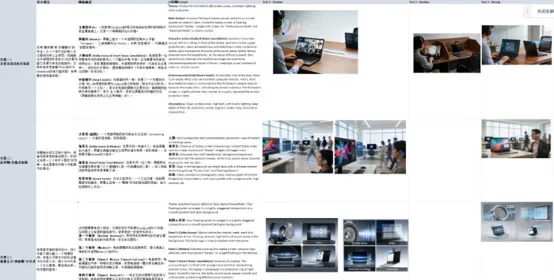
Next came AI-assisted concept generation. The team used multiple AI tools to rapidly explore scene logic, composition, and layout possibilities. This was especially useful in the early phase, when the client was still refining the visual direction. Instead of waiting days for a small number of manual drafts, the team could produce multiple visual paths quickly and compare them side by side.
But the process did not stop there.
3. Iterative prompt refinement & screening
Once the AI drafts were generated, the team refined the prompts, screened the results, and sent the strongest options to the client for feedback. This step mattered because in a project like this, the first usable idea is rarely the final one. The value of AI was not that it produced a perfect image in one pass. The value was that it moved the team much closer to the right answer, much faster.
4. Professional manual retouching
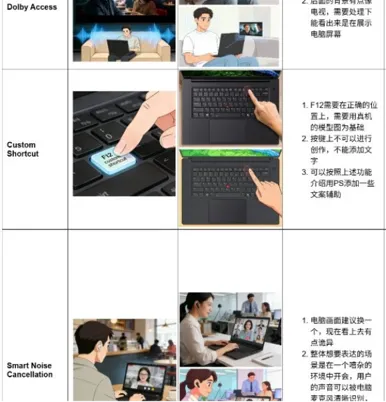
The last stage was professional retouching in Photoshop. This was where the work became enterprise-grade. Distortions were corrected. Laptop renders were replaced or composited more precisely. Brand details were cleaned up. UI elements were restored or redrawn when needed. The final image had to feel believable, accurate, and aligned with Lenovo’s standards.

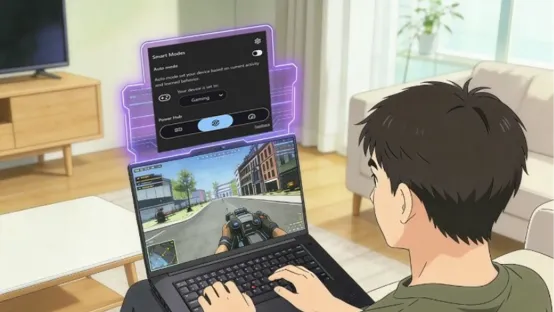
The result was a hybrid production model in which AI accelerated ideation and base creation, while human designers ensured realism, precision, and brand fidelity.
What the Process Looked Like in Practice
The real value of the workflow became visible in the iteration process.
In the early stages, the client’s requirements were still evolving. The team had to clarify shot composition, user posture, camera angle, screen placement, and whether hands or props should appear in the frame. For a project like this, those details are not minor. They define whether an image feels coherent or not.
In some cases, the client changed direction after seeing the first versions. A feature that was originally meant to be shown in one way was later replaced or reinterpreted. Sometimes the team had to simplify interface elements so they would make sense in a stylized scene. At other times, the client asked for a more realistic presentation, even when an earlier anime-style draft looked promising.
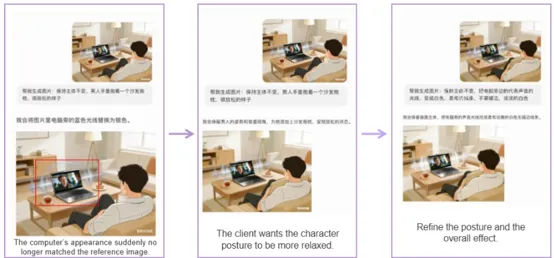
The project also exposed a practical truth about AI production: even a small revision can require a new base image. If the human posture changes, the angle changes, or the key object moves, much of the previous work may no longer be reusable. That sounds inefficient at first, but it also explains why AI is most valuable at the base-creation stage. It gives the team more room to explore ideas quickly, while post-production handles the accuracy.
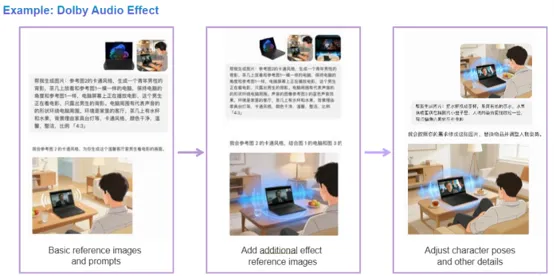
One of the strongest examples involved a functional illustration for Dolby Audio. The team went through repeated rounds of generation and refinement, adjusting the laptop angle, the character pose, the desk props, and the effect styling. Each round brought the image closer to a workable base. Once the core composition was right, Photoshop retouching made it possible to align the final image with the official product render.
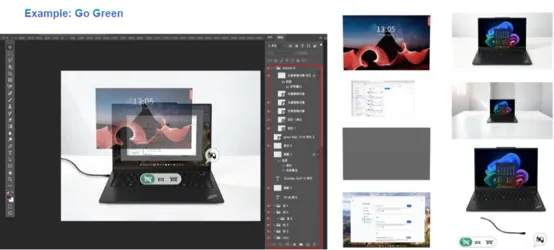
Another example, the “Go Green” visual, showed how much can be achieved when AI-generated bases and manual compositing work together. The project involved multiple screenshots, missing assets, and a large amount of retouching. The team even had to create some elements manually when source material was unavailable. In the end, the image was delivered through a structured iterative process rather than through a single perfect generation.
That is what made the workflow useful. It was not about replacing design judgment. It was about making design judgment more scalable.
What Lenovo Gained
From Lenovo’s perspective, the biggest gain was flexibility without losing quality.
The client was able to explore more ideas, more quickly, with less friction. The early outputs gave them room to refine their own thinking. In several cases, the client expanded the scope after seeing what the team could produce, which is a strong signal that the workflow created confidence as well as speed.
The project also showed that AI-assisted production can support global product launches when the process is structured properly. That matters for enterprise teams because launch content is rarely static. It needs to move across formats, platforms, and markets. A production system that can produce multiple visual styles while maintaining brand control is a meaningful operational advantage.
Most importantly, the result was not just faster delivery. It was a better creative process.
The team and the client developed a shared understanding of what the visuals needed to do, what AI could realistically contribute, and where human expertise remained essential. Over time, the project became more defined, more efficient, and more aligned with the final goal.
What This Means for Global Enterprises
The Lenovo project points to a broader shift in enterprise visual production.
AI-assisted image generation is mature enough to support real deliverables, but only when it is embedded in a disciplined workflow. The tools themselves are not enough. What makes the process work is the combination of prompt discipline, structured review, careful brand governance, and skilled post-production.
For global companies, that means three things:
Product launch cycles can move faster when early concept generation is accelerated.
Production costs can be reduced when base imagery is generated more efficiently.
Visual content can become more flexible, making it easier to support different markets, formats, and creative directions without rebuilding every asset from scratch.
The lesson is not that AI replaces design but that AI can amplify design when the workflow is built correctly.
For Lenovo, that meant a faster and more adaptable image production process for commercial product content. For Clearly Local, it confirmed a practical principle that applies across enterprise creative work: the best results come when AI speed and human precision are treated as complementary strengths, not competing ones.