


Key Takeaways:
- Effective user guides should prioritize helping specific audiences complete tasks and achieve goals, rather than documenting every feature or technical detail.
- The most valuable user guide content includes onboarding steps, core workflows, risk-related guidance, and common troubleshooting information that directly supports successful task completion.
- To keep documentation useful and maintainable, organizations should move technical references, edge cases, and background information into appropriate supporting resources while continuously updating guides based on user data and feedback.
One of the most common documentation mistakes is assuming that more information automatically creates a better user guide.
Product teams often want documentation to capture every feature, exception, and technical detail. Users, however, usually want to complete a task as quickly as possible and get on with their day.
When organizations fail to balance these competing priorities, user guides become repositories of information rather than tools for enablement. The result is often a frustrating experience: users struggle to find what they need, support teams field avoidable questions, and product adoption suffers.
For multinational organizations, the impact is even greater. Every unnecessary page must be reviewed, maintained, translated, and updated across languages and markets, increasing both costs and complexity.
How, then, do teams decide what actually belongs in a user guide? The answer lies in understanding user goals, identifying task-critical information, and establishing clear boundaries between user-facing guidance and supporting documentation.
Who Is the User Guide Really For—and What Are They Trying to Achieve?
Determining what belongs in a user guide starts with a fundamental principle: effective documentation should be organized around what users need to accomplish, not around how a product is built. Before teams can decide what content to include, they must first understand who their users are and what outcomes they are trying to achieve.
Most enterprise products serve multiple audiences, each with different goals, responsibilities and levels of technical expertise. A SaaS platform, for example, may be used by operational users, system administrators, security teams, and integration partners. Each group interacts with the product differently and requires a different type of guidance.
- End users need straightforward, task-focused workflows that help them complete daily activities efficiently.
- System administrators need configuration steps, permission structures, and security protocols.
- Technical specialists need API references, schema definitions, and integration details.
Attempting to serve all of these audiences within a single document often creates unnecessary complexity and makes it harder for users to find the information they need. Many organizations address this challenge through role-based documentation strategies, user personas, or customer journey mapping exercises that help identify the content relevant to each audience.
Rather than relying on assumptions about what users need, documentation teams should use qualitative and quantitative data to identify the tasks, pain points, and workflows that matter most.
Useful sources of insight include:
- Support ticket telemetry: What setup steps or workflows generate the highest volume of support queries?
- Product analytics: Which features are used most frequently, and where do users abandon tasks?
- Direct customer feedback: At which point do users report confusion or frustration?
- Stakeholder insights: Which topics do customer success managers, solutions architects, and support teams explain repeatedly?
This analysis often reveals a significant gap between feature-oriented and task-oriented documentation. Users rarely search for features; they search for ways to accomplish specific goals. Feature-oriented documentation explains what a feature does, while task-oriented documentation shows users how to achieve a desired outcome.
What Information Is Essential for Users to Complete Their Tasks Successfully?
Once user goals have been identified, the next step is determining which information users need to complete those tasks successfully. The most effective user guides focus on helping users take action rather than documenting every aspect of the product. To achieve this, core user guide content typically falls into four categories.
1. Getting Started Instructions
Users need a clear path from initial access to their first successful outcome. This includes installation, authentication, account setup, and other essential onboarding steps that help users begin using the product with confidence.
2. Core Workflows and Procedures
This category covers the most common and business-critical tasks users perform regularly. Procedures should follow real-world user journeys and provide clear, action-oriented instructions. For example, “Select Export, then enter the date range” is more effective than “The export feature allows date selection” because it tells users exactly what to do.
3. Safety, Compliance, and Risk-Related Guidance
For regulated, industrial, healthcare, or security-sensitive environments, warnings and compliance requirements are essential. However, they should appear where users encounter the associated risk rather than being isolated in lengthy standalone sections. Contextual guidance improves visibility and encourages correct action.
4. High-Probability Troubleshooting
Users should be able to resolve common issues without abandoning their workflow. Including guidance for likely errors, missing prerequisites, or dependency-related issues directly within relevant procedures helps users recover quickly and reduces unnecessary support requests.
A useful test is simple: if a piece of information does not help users complete a task, make a decision, avoid a risk, or recover from an error, it likely does not belong in the core user guide. It may still have value, but it is often better suited to a knowledge base, reference guide, or training resource.
What Should Be Left Out of the User Guide—and Placed Elsewhere Instead?
Deciding what not to include in a user guide is often more difficult than deciding what to include. Engineering teams naturally want to document the inner workings of a product, while business stakeholders often want to preserve contextual information. However, overloading user-facing guides with supporting information makes finding essential guidance more difficult.
Common types of content that should generally be removed from the core user guide include:
- Deep architectural explanations: While valuable for developers and solution architects, infrastructure details rarely help users complete operational tasks and can distract from procedural guidance.
- Deep architectural explanations: While valuable for developers and solution architects, infrastructure details rarely help users complete operational tasks and can distract from procedural guidance.
- Internal business processes or company history: Information about organizational decisions or feature development timelines provides context but usually does not support task completion.
- Developer-level API specifications: Integration documentation requires its own structure, terminology, and maintenance process that differs significantly from user-focused procedural content.
- Legacy feature documentation: Instructions for legacy or no-longer-supported features can create confusion and reduce trust in the accuracy of the documentation.
- Low-frequency edge cases: Rare scenarios are often better maintained in a searchable knowledge base, where users can find them when needed without overwhelming the primary guide.
Rather than forcing every type of information into a single document, modern documentation strategies rely on an information ecosystem, where each content asset serves a specific audience and purpose.
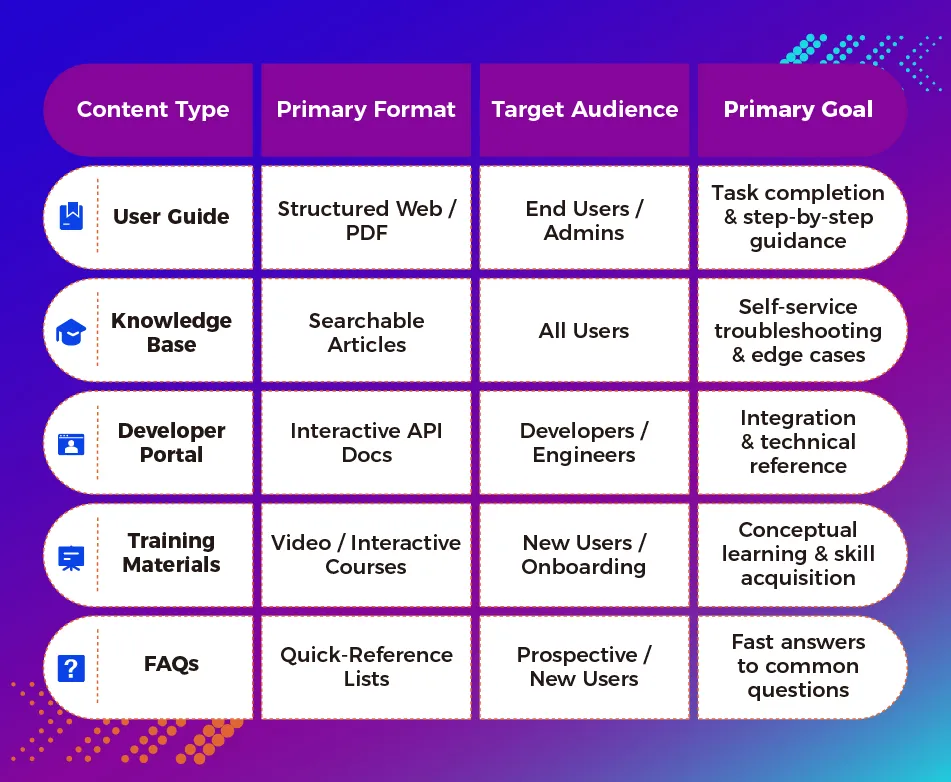
The goal is not to eliminate information but to place information where users can find it most effectively. When each content type has a clear home, user guides remain focused on task completion, while supporting resources provide deeper technical detail, onboarding support, and advanced troubleshooting for specialized audiences.
Conclusion: Building User Guides That Stay Relevant as Products Evolve
Determining what belongs in a user guide is not a one-time decision. As products evolve, user expectations shift, workflows change, and new features are introduced, documentation must evolve alongside them. The most effective user guides remain focused on helping users accomplish their goals while continuously adapting to real-world usage patterns.
To keep documentation relevant and useful over time, organizations should establish governance processes that regularly validate content against user needs and product realities. Three practices are particularly important:
1. Data-Driven Content Reviews
Regularly evaluate documentation performance using analytics. High search volume for a particular topic or repeated support requests may indicate that important workflows need clearer coverage within the user guide. Conversely, low-engagement content with little user impact may be a candidate for consolidation, relocation, or retirement.
2. Feedback Loops Integrated into the Product
Incorporating feedback mechanisms directly within documentation platforms allows organizations to identify unclear instruction, outdated content, and emerging user challenges. Simple tools such as article ratings or inline comments provide valuable signals for continuous improvement.
3. Scalable Localization Strategies
For global organizations, documentation must be designed with localization in mind from the outset. Modular content architectures and structured authoring approaches make it easier to maintain consistency across languages, reduce translation effort, and ensure updates reach every market efficiently. Keeping user guides focused on essential task-oriented content further minimizes maintenance overhead and localization costs.
Ultimately, the best user guides are not the most comprehensive—they are the most useful. Their success is measured not by the volume of information they contain, but by how efficiently they help users accomplish their goals and overcome challenges with confidence.
Optimize Your Global Technical Documentation
Are your user guides helping customers succeed—or overwhelming them with information? Clearly Local’s technical writing experts help organizations create streamlined, task-focused documentation that improves user experience, reduces support costs, and lowers long-term maintenance and localization effort. Discover our technical writing services today.
A user guide should include the information users need to complete tasks successfully, including getting-started instructions, onboarding steps, core workflows, safety or compliance guidance when relevant, and troubleshooting for common issues, all presented in a clear, action-oriented format focused on user goals rather than product features.
Content that supports routine task completion, decision-making, and common workflows belongs in the user guide, while less common scenarios, edge cases, advanced troubleshooting, and supplementary information are better placed in a searchable knowledge base where users can find them as needed without cluttering core documentation.
User guides should generally exclude detailed technical architecture, developer-focused specifications, company history, internal business processes, outdated feature information, and low-frequency scenarios because these details can distract users from the practical guidance they need to complete tasks efficiently.
A user-centric documentation framework starts by identifying user roles and goals, uses customer data and feedback to understand key tasks and pain points, organizes content around real-world outcomes instead of product features, and includes only the information required for task completion, risk avoidance, and problem resolution.
Organizations can reduce support tickets by documenting the workflows that generate the most user questions, embedding troubleshooting guidance directly within procedures, addressing common errors and prerequisites proactively, and continuously improving content based on support telemetry, analytics, and user feedback.